Short answer: website speed in 2026 is a direct factor in both sales and Google rankings. The search engine measures it with three Core Web Vitals metrics: LCP (the main content should appear within 2.5 s), INP (response to user actions under 200 ms) and CLS (layout stability under 0.1). According to Google, 53% of mobile visitors abandon a page that takes more than 3 seconds to load, and Deloitte research showed that speeding up a mobile site by just 0.1 second delivers +8–10% to retail conversion. 90% of speed problems come down to six causes — heavy images, weak hosting, excess plugins, no caching, third-party scripts and unoptimised fonts — and all of them are fixable. A speed audit starts from UAH 5,000, full optimisation costs UAH 15,000–50,000 and usually pays for itself within months.
This is the most «technical» article in our series, but it is written for business owners. After reading it you'll be able to check your own site, understand a developer's report and avoid overpaying for optimisation.
Why speed is money, not a «technical detail»
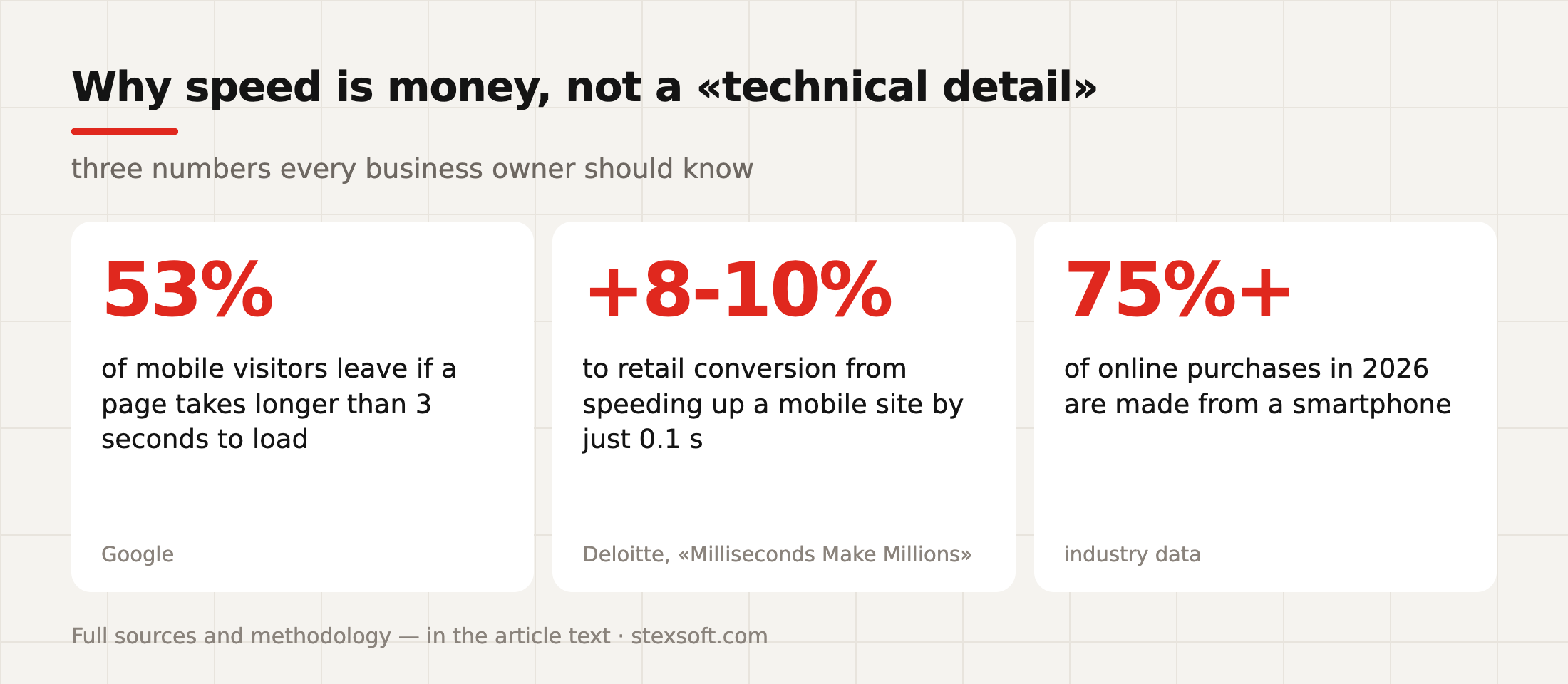
Let's start with the numbers every site owner should know:
- 53% of mobile visitors close a page if it takes longer than 3 seconds to load (Google research). In other words, a slow site loses more than half of its mobile traffic before the first screen even appears.
- +8–10% to conversion in retail comes from speeding up a mobile site by just 0.1 second — the conclusion of Deloitte's large-scale «Milliseconds Make Millions» study. One tenth of a second. In travel, the same shift delivered +10% to conversion.
- Over 75% of online purchases in 2026 are made from smartphones — and mobile internet is less stable than home Wi-Fi, so «it flies on my computer» tells you nothing about the real experience of your customers.
Now let's put it together with an example. A store with 10,000 visitors a month, 1.5% conversion and an average order of UAH 1,500 earns UAH 225,000/month. If slow loading costs it even 20% of mobile visitors and part of the conversion, the bill runs into tens of thousands of hryvnias every month. And the advertising is paid for in full: you pay for clicks from people who never waited for the page to load. Speed is only one of the reasons a website brings no leads.
And the other side of the coin — SEO. Google officially uses speed metrics as a ranking factor, and with the spread of AI search the situation has only sharpened: the ChatGPT and Perplexity crawlers don't «like» slow pages either — we covered this in detail in our article on GEO. A slow site loses twice: with people and with algorithms.
Core Web Vitals in plain language
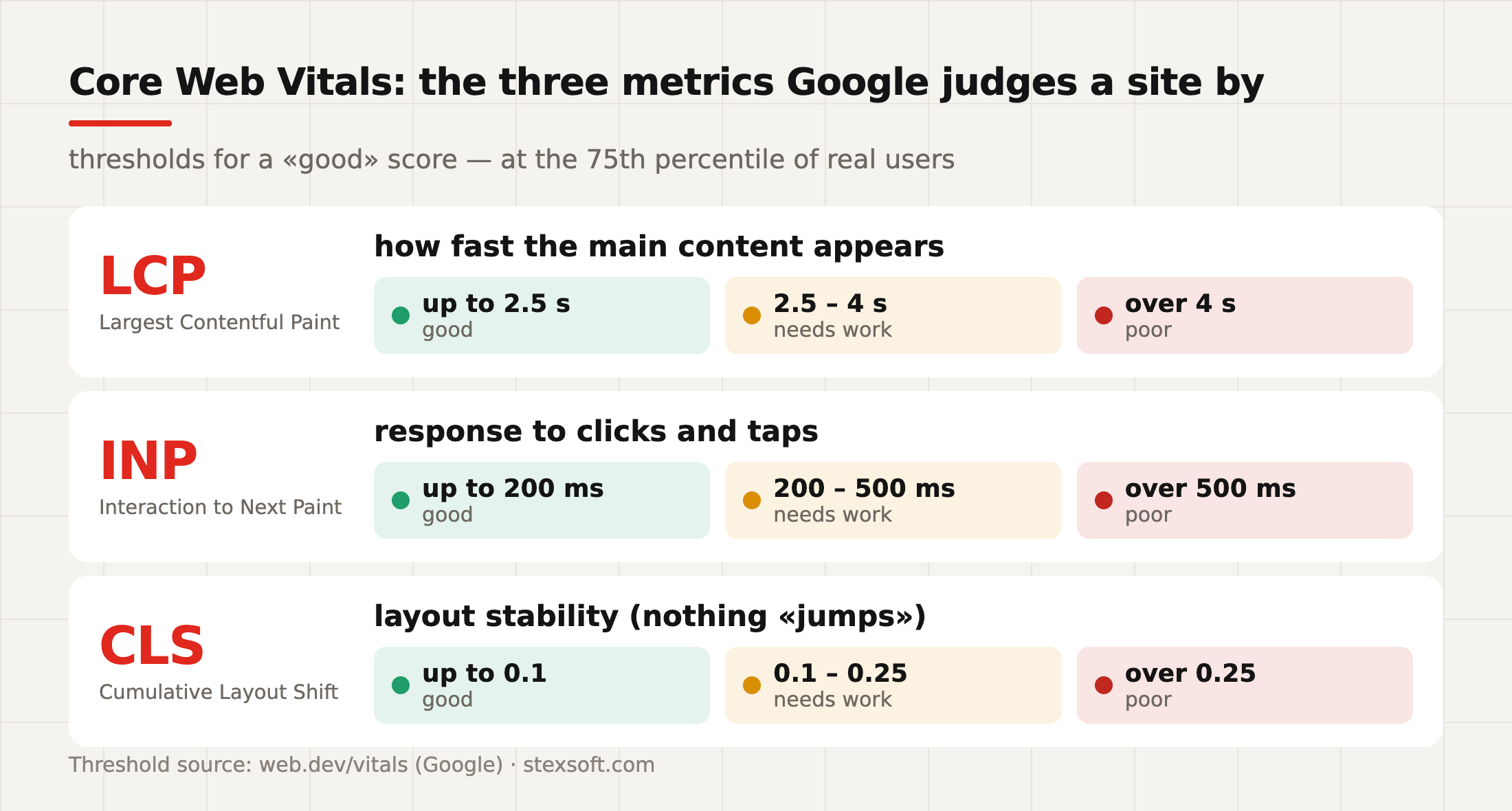
Core Web Vitals (CWV) are three metrics Google uses to measure the real user experience on your site. Not «speed in general», but three concrete human sensations:
LCP — Largest Contentful Paint. How long it takes for the main content to appear: the banner, the product photo, the heading. It answers the question «how long am I staring at a white screen?». Good — up to 2.5 seconds, poor — over 4.
INP — Interaction to Next Paint. How quickly the site responds to actions: a click on «Add to cart», opening the menu, selecting a filter. Good — up to 200 ms, poor — over 500 ms. In 2024 this metric replaced the old FID and became stricter: it measures every interaction in a session, not just the first one. INP is exactly what script-heavy stores fail most often.
CLS — Cumulative Layout Shift. Layout stability. A familiar situation: you aim for a button, a banner finishes loading at that moment, everything shifts — and you click an ad instead. That is a layout shift. Good — up to 0.1, poor — over 0.25.
An important detail that even some contractors miss: Google evaluates CWV at the 75th percentile of real users (Chrome UX Report data). That means a site counts as fast when it is fast for 75% of visitors — on their average phones and mobile connections, not on a developer's powerful laptop in an office with fibre.
How to check your site in 5 minutes
Three free tools, in order of usefulness for an owner:
- PageSpeed Insights (pagespeed.web.dev). Paste a page address and you get two blocks of data. The top one, «What real users are experiencing», is your Core Web Vitals from real traffic (if there is enough of it). The bottom one, the lab test, is a diagnosis with concrete recommendations. Look first at the top block and at the mobile tab.
- Search Console → the «Core Web Vitals» report. It shows how many pages of the site Google considers slow and groups them by typical problems. The most convenient way to see the picture across the whole site rather than a single page.
- Your own phone on a mobile network. Turn off Wi-Fi, open the site in incognito mode and walk the buyer's path: home → category → product → cart. This is the cheapest audit possible — and the most honest.
Don't check only the homepage: product and cart pages are usually slower, and they are exactly the ones that convert money.
One important caveat about the numbers. The «PageSpeed score» is a lab measurement that depends on many conditions and changes from run to run. So a promise of «we'll get you 90+ points» in a commercial proposal is a marketing trick, not a professional goal. The correct goal of optimisation is the green zone of Core Web Vitals based on real user data — that is what Google sees and what affects sales.
Top 6 reasons your website is slow
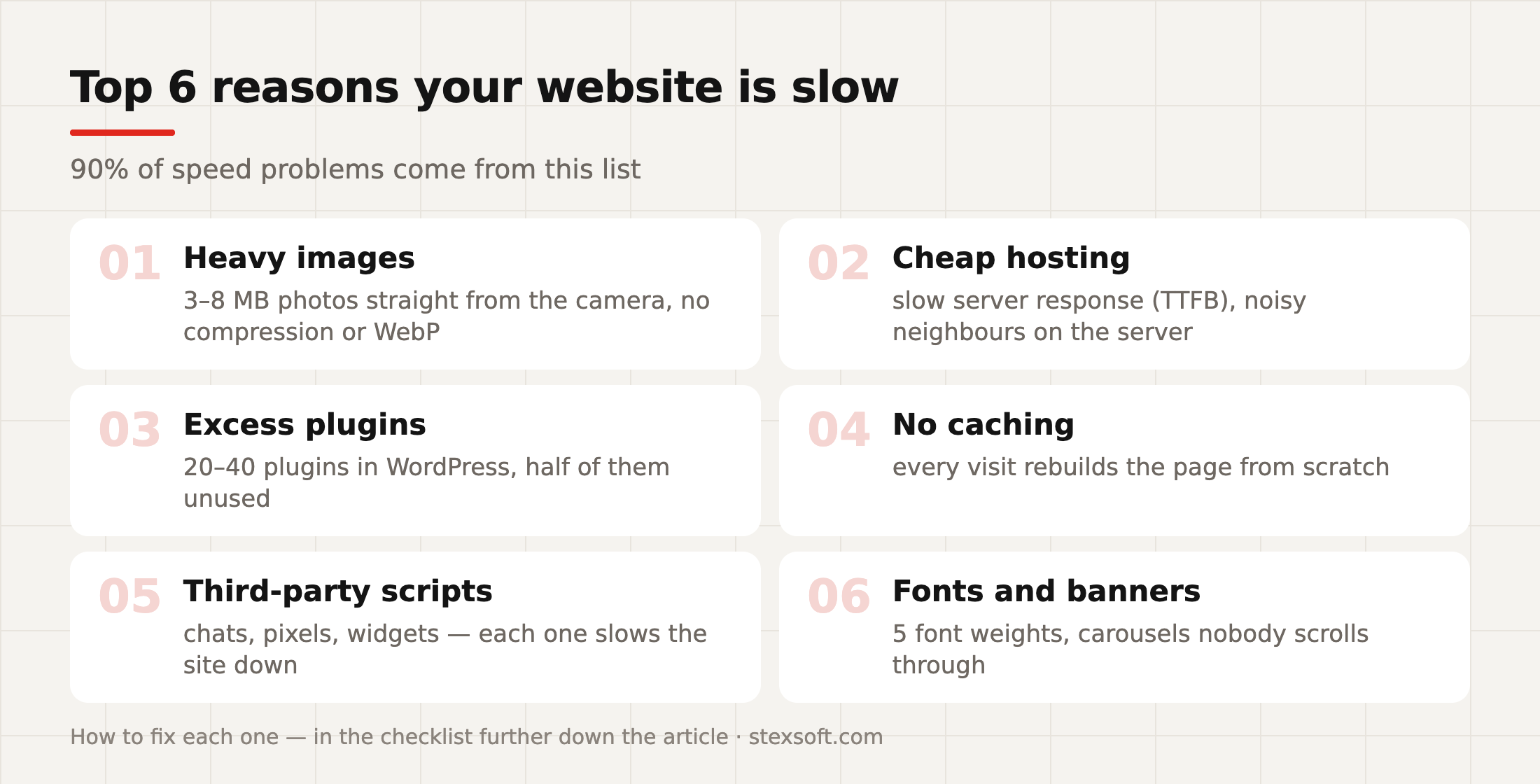
In our audit experience, 90% of speed problems come from six causes:
- Heavy images. Photos of 3–8 MB, uploaded straight from a camera or a stock library without compression. One catalogue page with twenty such photos is tens of megabytes. The most common and the cheapest problem to fix.
- Cheap or unsuitable hosting. If the server delivers the first response (TTFB) in 1.5–2 seconds, no amount of site-side optimisation will save you — the foundation is slow. This hits stores especially hard: generating a catalogue page with filters takes resources.
- Excess plugins. A typical WordPress site «with a history» has 25–40 plugins, half of which are actually used. Each one adds its own scripts, styles and database queries.
- No caching. Without a cache the server assembles every page from scratch for every visitor — instead of serving a ready copy in milliseconds.
- Third-party scripts. Live chat, pixels from three ad systems, a review widget, maps, a video player — every «free» widget arrives with its own code. Ten of them and INP is in the red zone.
- Fonts and decorative elements. Five font weights from an external service, full-screen carousels, background videos. Beautiful in a design presentation — painful on a customer's phone.
Optimisation checklist: 10 steps by priority
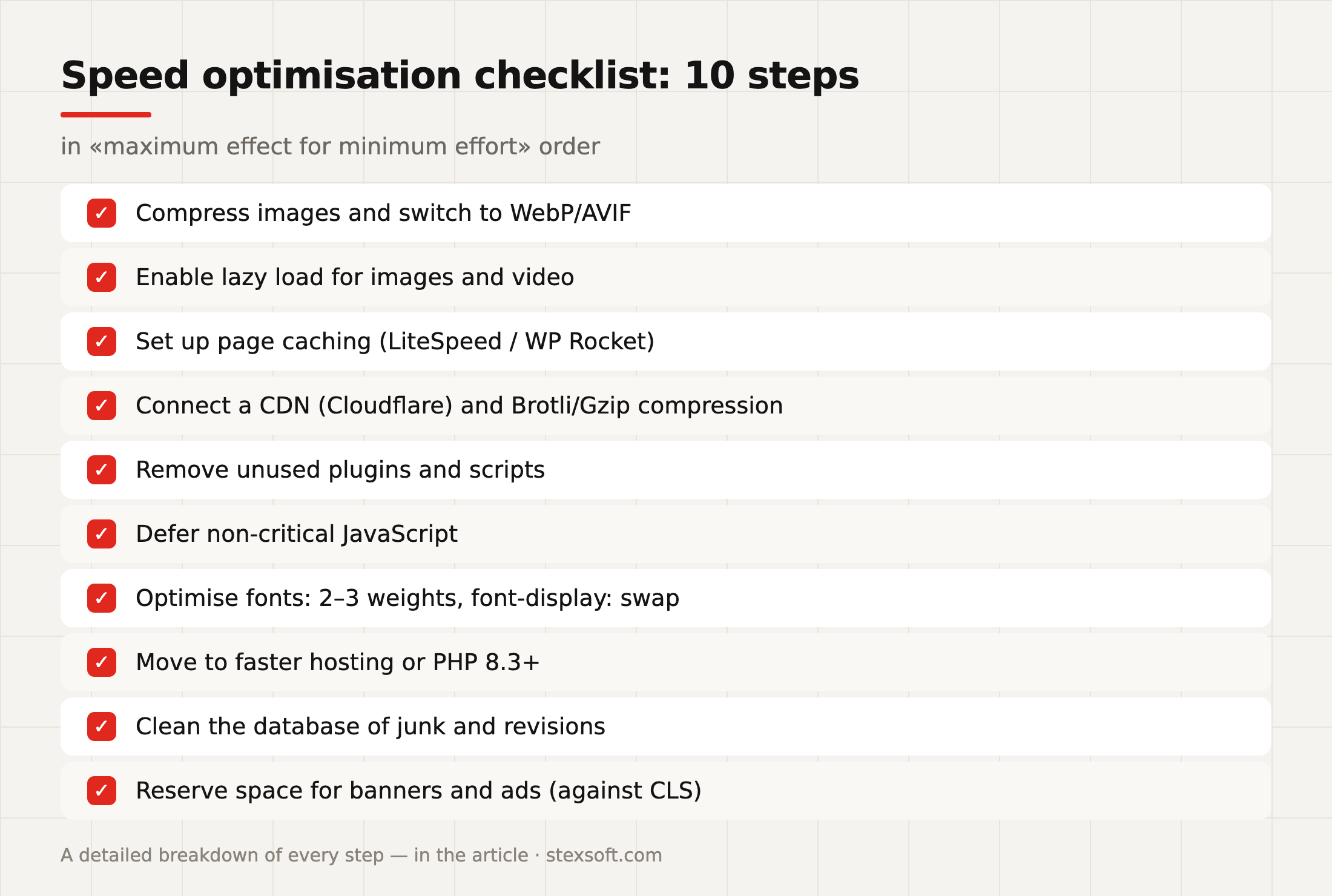
The order is not accidental — from maximum effect for minimum effort:
- Compress images and switch to WebP/AVIF. Modern formats are 30–70% lighter than JPEG with no visible quality loss. On WordPress this is automated with a plugin, on OpenCart with a module or at server level.
- Enable lazy load. Images below the first screen should load as the user scrolls, not all at once.
- Set up page caching. For WordPress on LiteSpeed hosting — LiteSpeed Cache (free and one of the most effective); alternatives are WP Rocket and W3TC. For OpenCart — the built-in cache plus a server-side one.
- Connect a CDN and modern compression. Cloudflare gives you a CDN, Brotli compression and, as a bonus, a protective shield against attacks even on the free plan.
- Review your plugins and scripts. The rule is simple: not used — deleted (not deactivated, deleted). For every third-party widget ask: does it bring in more than it costs in speed?
- Defer non-critical JavaScript. Analytics, pixels and chats should load after the content (defer/delay), not block it. This is the main lever for INP.
- Optimise fonts. 2–3 weights maximum, hosted locally, font-display: swap, preload for the main font.
- Review your hosting and PHP version. Moving to PHP 8.3+ alone speeds up WordPress and OpenCart; a LiteSpeed server adds more. If TTFB is consistently over 600–800 ms, it's time to move.
- Clean up the database. Post revisions, ghost carts, module logs — over the years they add up to hundreds of megabytes that slow down every query.
- Reserve space for dynamic content. Banners, ad blocks and images must have reserved dimensions — this cures CLS, those very layout «jumps».
After every major step — measure. Optimisation without a «before/after» measurement is repair work with your eyes closed.
Specifics of optimising WordPress and OpenCart
WordPress/WooCommerce. The platform's strength — its plugin ecosystem — is also the main risk to speed. The working combination we use: LiteSpeed hosting + LiteSpeed Cache + WebP + Cloudflare, strict plugin discipline, and moving catalogue search to fast solutions on large databases. A separate point is themes: a heavy all-in-one multipurpose template can keep a site in the yellow zone all by itself.
OpenCart. Lighter than WordPress out of the box, but it has its own pains: unoptimised filter-module queries on large catalogues, bloated session and cart tables, outdated engine versions. The cure is caching, database indexes and a module review — we wrote about the strengths and weaknesses of the platforms in more detail in our comparison of WordPress, OpenCart and Laravel.
And for both platforms: speed is not a one-off campaign, it's a regime. Every new plugin, banner or analytics script is a potential step backwards, so CWV is worth checking monthly (this is usually part of technical support).
A typical case: a store before and after optimisation
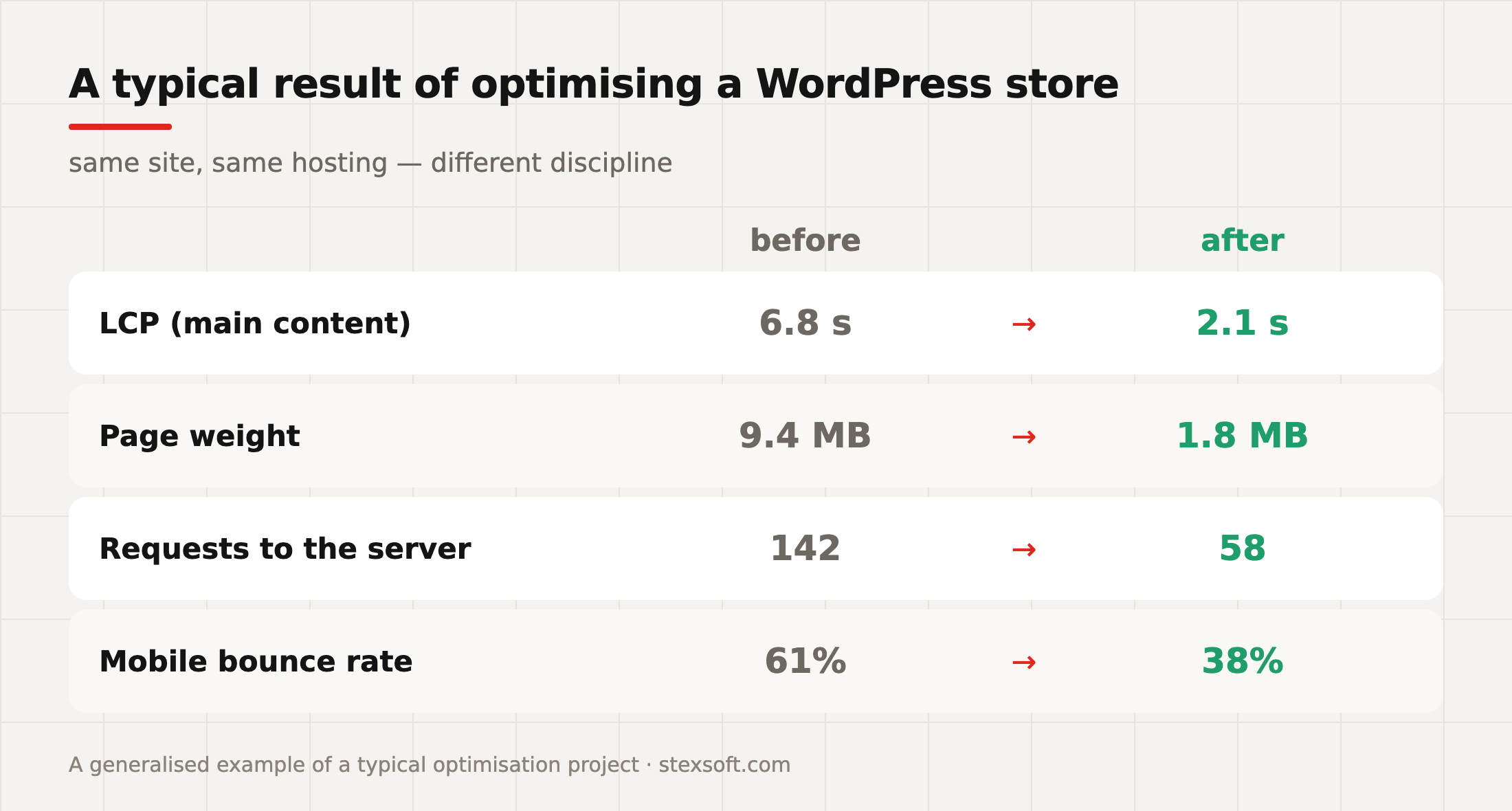
A generalised but very typical portrait of an optimisation project — a WooCommerce store, 3–4 years old, «the site has started to lag»:
Diagnosis: product photos of 4–6 MB, 34 active plugins (about 20 in use), no caching, 6 third-party scripts in the header, hosting with TTFB around 1.2 s.
Work done, following the checklist above: converting images to WebP + lazy load, cutting plugins down to 19, LiteSpeed Cache, Cloudflare, defer for scripts, migration to LiteSpeed hosting, database cleanup.
Result: LCP from 6.8 s to 2.1 s, page weight from 9.4 MB to 1.8 MB, requests from 142 to 58, mobile bounce rate from 61% to 38%. The site moved into the green CWV zone based on real users — and, more importantly for the owner, mobile conversion grew before any changes to advertising.
Note: no magic, no «rewrite everything from scratch» — discipline and consistency.
How much speed optimisation costs
| Service | Approximate cost | What's included |
|---|---|---|
| Express audit | UAH 5,000 – 10,000 | CWV measurements, a prioritised list of problems |
| Basic optimisation | UAH 15,000 – 30,000 | images, caching, CDN, scripts, fonts |
| Full store optimisation | UAH 30,000 – 50,000+ | + database, hosting migration, work on the theme and modules |
| Speed maintenance | part of technical support | monthly CWV monitoring, checks after updates |
For a sense of scale: basic optimisation costs about as much as a few days of the average store's ad budget — and it works on conversion permanently. It is one of the fastest-paying investments in a site that already has traffic (if there is no traffic yet, start with our article on website costs and build the foundation properly from scratch).
Frequently asked questions (FAQ)
StexSoft runs speed audits and full optimisation of WordPress and OpenCart websites: Core Web Vitals, LiteSpeed, Cloudflare, code and database cleanup. Send us your website address — we'll do an express measurement and tell you honestly whether there is anything to speed up.
What are Core Web Vitals in simple terms?
Three Google metrics about the real user experience: LCP — how quickly the main content appears (target under 2.5 s), INP — how quickly the site responds to clicks (under 200 ms), CLS — whether the layout «jumps» (under 0.1).
How can I check my website speed for free?
PageSpeed Insights for an individual page, the «Core Web Vitals» report in Search Console for the whole site, and your own phone on a mobile network for an honest check through a customer's eyes.
Does website speed affect Google rankings?
Yes, Core Web Vitals are an official ranking factor. But the indirect effect is even stronger: a slow site has worse behavioural metrics, and that hits SEO and conversion at the same time.
How much does it cost to speed up a website?
An audit — from UAH 5,000, basic optimisation — UAH 15,000–30,000, full optimisation for a store — up to UAH 50,000+. The exact figure depends on the platform and how neglected the site is.
Why did the site slow down again after optimisation?
Because speed is a process: new plugins, banners and scripts gradually bring the problems back. The solution is monthly CWV monitoring as part of technical support.
Is a «PageSpeed 90+» promise normal?
Be careful: the lab score changes from run to run and is not Google's goal. The correct target is the green zone of Core Web Vitals based on real user data. A contractor who understands this usually understands the rest too.
What gives a bigger effect: optimisation or a new website?
If the site is under 4–5 years old and the platform suits the task, optimisation is almost always cheaper and faster. A rebuild from scratch is justified when the architecture itself is slow or the platform no longer matches the business.



Comments(0)
No comments yet — be the first.
Comments are moderated before they appear.
No comments yet — be the first.